UnityDesk
UnityDesk
UnityDesk
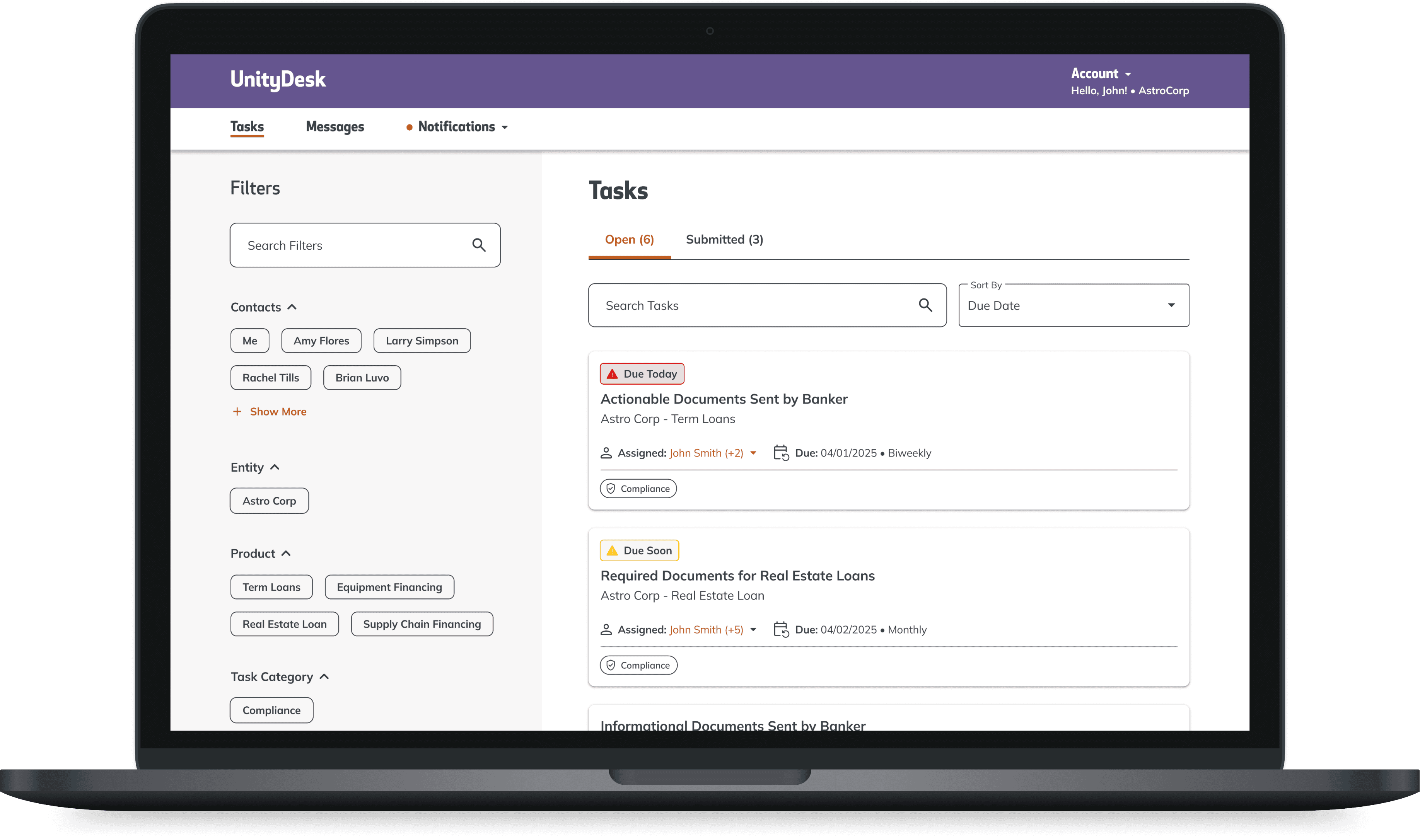
UnityDesk is a secure portal for streamlined document exchange and collaboration between Barcliff & Hunt bank employees and customers.
UnityDesk is a secure portal for streamlined document exchange and collaboration between Barcliff & Hunt bank employees and customers.
UnityDesk is a secure portal for streamlined document exchange and collaboration between Barcliff & Hunt bank employees and customers.
ROLE
Lead UX Visual Designer
January 2024 - Present
Lead UX Visual Designer
January 2024 - Present
Lead UX Visual Designer
January 2024 - Present
overview
Creating an integrated digital solution
In 2021, through an internal study Barcliff & Hunt identified inefficiencies in commercial banking due to fragmented systems, requiring colleagues to juggle multiple vendors, emails, and calls. To streamline operations and enhance competitiveness, the bank launched an integrated sales, onboarding, and lending solution built for seamless integration and future scalability.
As lead UX Visual Designer, I worked closely with UX to create high-fidelity interfaces, refining existing designs and developing new features to improve the user experience.
In 2021, through an internal study Barcliff & Hunt identified inefficiencies in commercial banking due to fragmented systems, requiring colleagues to juggle multiple vendors, emails, and calls. To streamline operations and enhance competitiveness, the bank launched an integrated sales, onboarding, and lending solution built for seamless integration and future scalability.
As lead UX Visual Designer, I worked closely with UX to create high-fidelity interfaces, refining existing designs and developing new features to improve the user experience.
Validating Designs
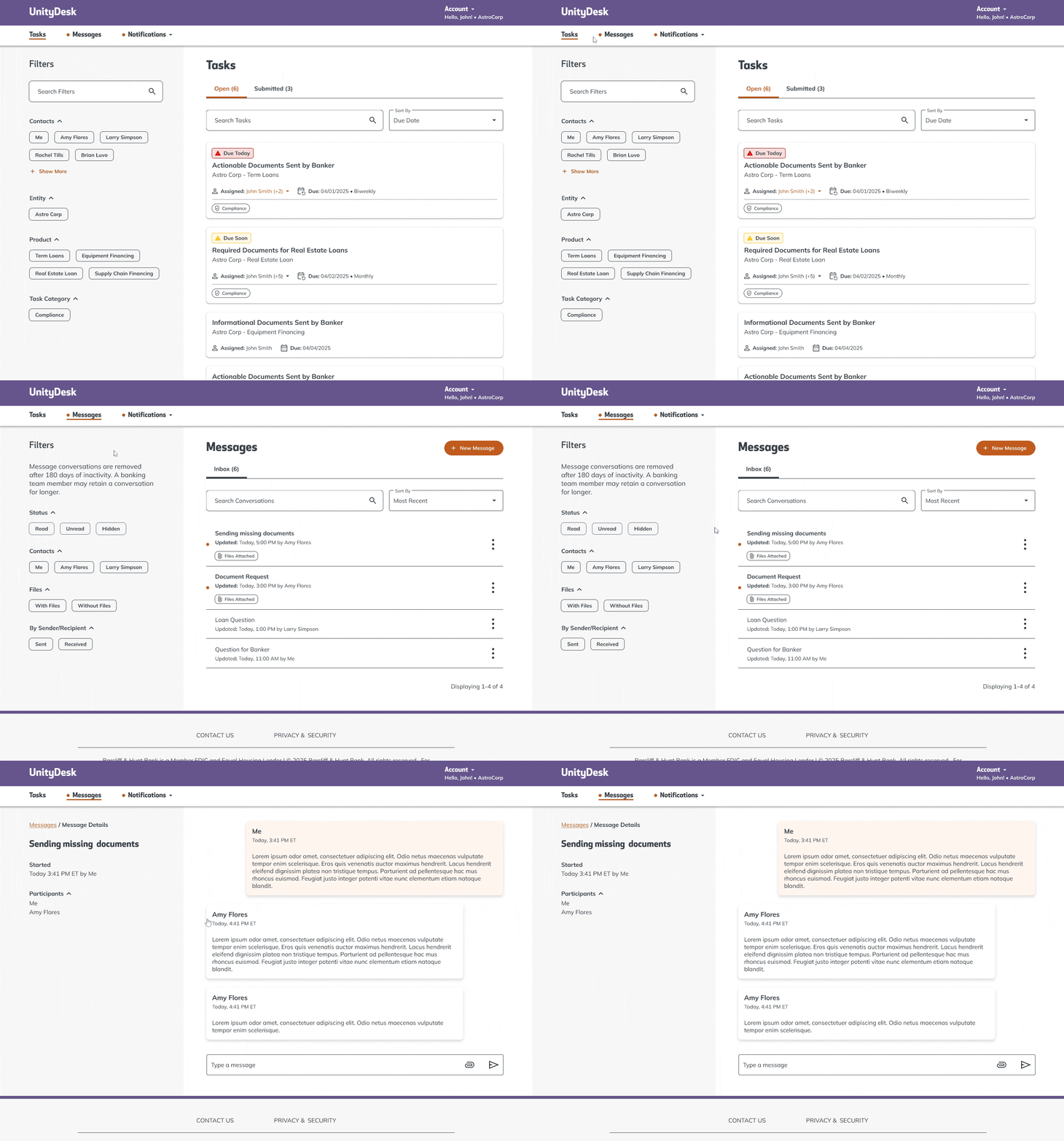
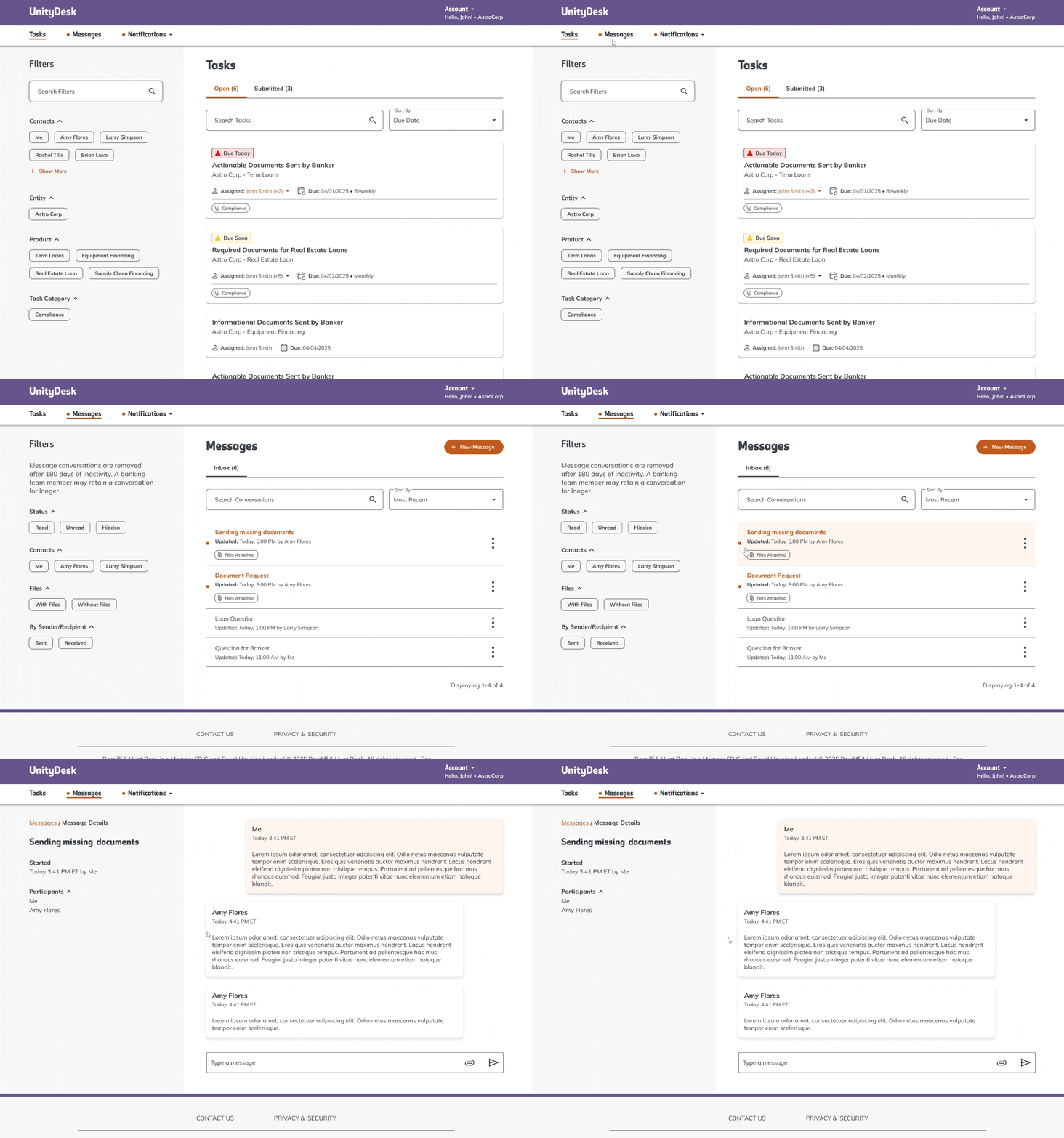
Following the Agile UX process, we design based on industry-best patterns, test with users, and iterate based on research findings. For example, user testing of our messaging feature revealed confusion around archiving, as users expected messages to remain despite content stating they’d be deleted. In response, we introduced a “hide” option, allowing users to manage their inbox without deletion, which wasn’t available at launch.
Login enhancements
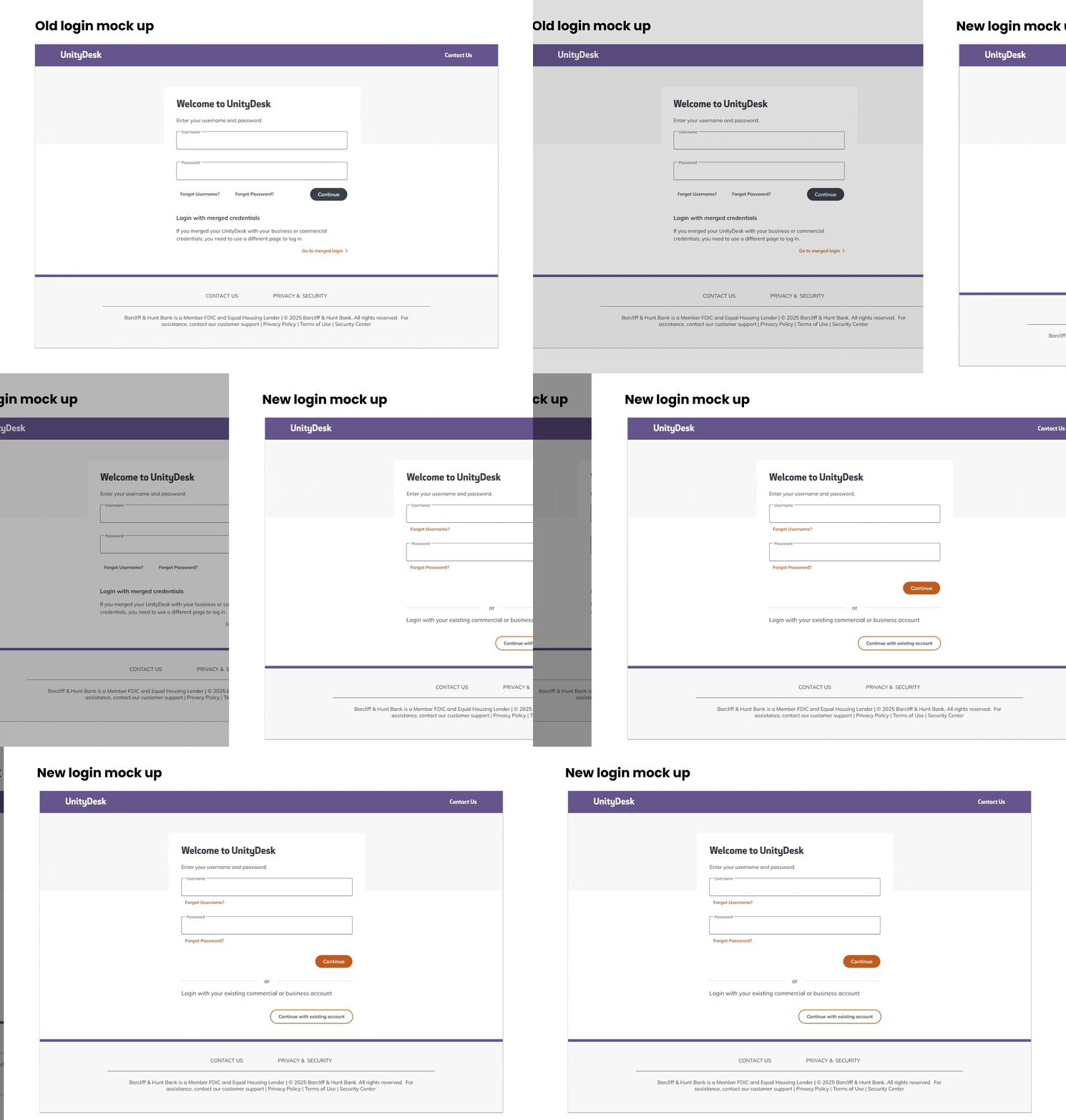
I redesigned the login page to enhance usability, accessibility, and aligned it with the new design system. I refined the visual hierarchy by adjusting typography, spacing, and contrast to improve readability and guide users. The CTAs were made more prominent and error recovery links were grouped for easier access.
Task management
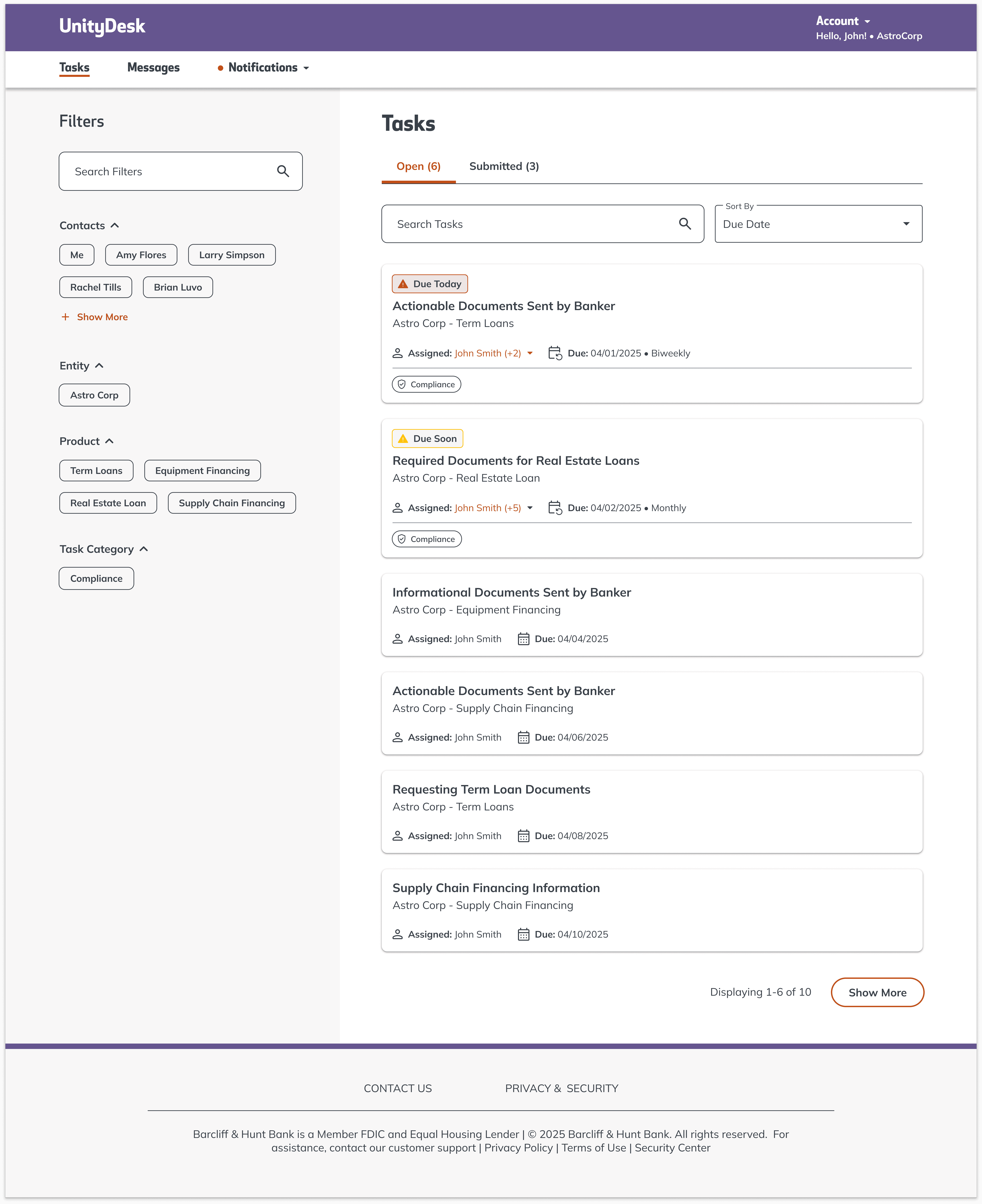
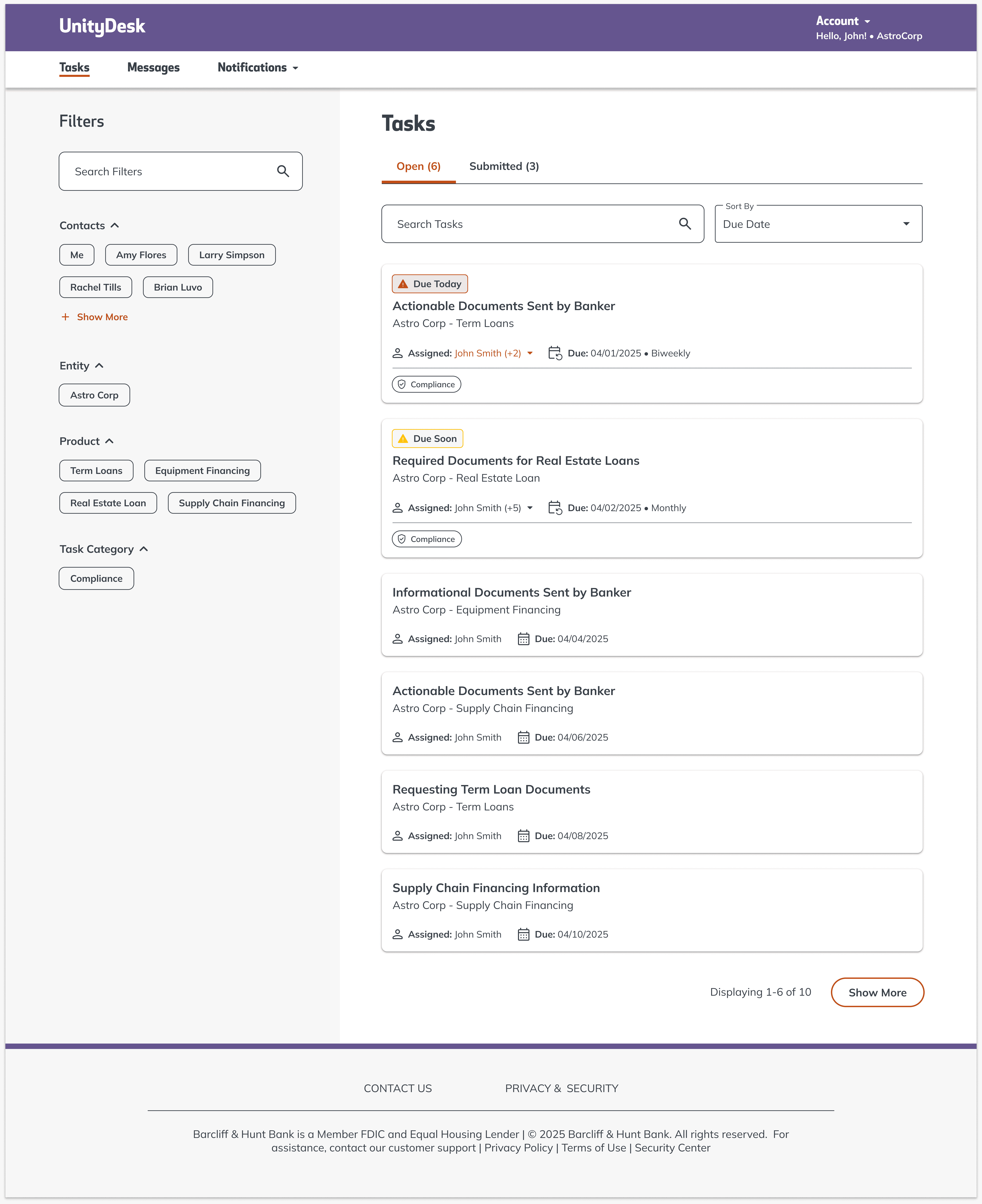
The Task Page centralizes loan document management, reducing manual follow-ups and inefficiencies. With sorting and filtering options, customers can quickly find outstanding tasks, ensuring a smoother loan process while minimizing delays and workload for bank employees.

Design decisions
I enhanced the visual hierarchy and clarity to streamline loan document management. Color-coded status labels highlight urgent tasks, while the left-hand filter panel helps users prioritize efficiently. Typography and spacing ensure a scannable layout, reducing cognitive load. Consistent design patterns improve usability and familiarity. These decisions create a more intuitive experience for customers and reduce inefficiencies for bank employees.
Streamlining document requests & uploads
Tasks that allow users to send or receive documents streamlines document exchange by replacing manual uploads and email-based submissions, allowing customers to securely download and upload files in one place.
Design decisions
Design decisions
Design decisions


Stay Informed with notifications
Easily access important updates within UnityDesk and via email—no need to search through old emails. With real-time notifications customers stay on top of their applications, reducing delays and manual follow-ups from our team. This streamlined experience enhances engagement and drives a faster, more efficient process for everyone.
Design decisions
Design decisions
Design decisions
Seamless communication with messaging
Seamless communication with
messaging
UnityDesk’s messaging feature enables real-time, direct communication between customers and colleagues—reducing manual follow-ups and ensuring timely updates on applications. This streamlined, two-way interaction boosts transparency and accelerates the loan process.
Design decisions
Design decisions
Design decisions
Research
The solution speaks first — Here’s how we got there
An internal study revealed that our commercial banking faced inefficiencies due to fragmented systems, requiring colleagues to rely on multiple vendors, emails, and calls. This caused delays, errors, and poor transparency, highlighting the need for an integrated solution to improve productivity and stay competitive.
Uncovering opportunities for Improvement
Based on our analysis of 200+ customer and colleague insights, we identified six recurring challenges. Through reimagination workshops, we uncovered four main areas of opportunity.
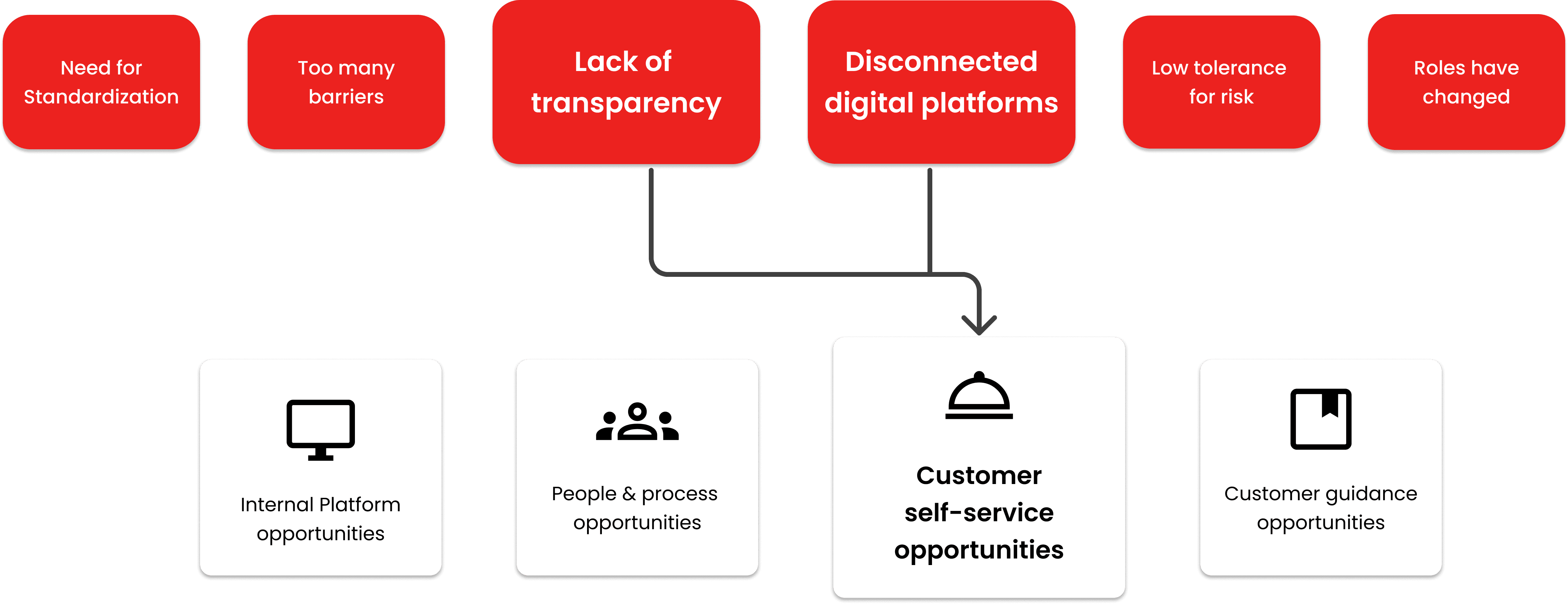
One of these opportunities—customer self-service—emerged from addressing challenges such as lack of transparency and disconnected digital platforms. By further exploring customer self-service, we identified three key objectives that, when addressed, would resolve the most common pain points experienced in the onboarding and lending journeys.
The three key objectives
Enhancing Security
Resolve authentication challenges and improve the onboarding process.
Painpoints
Authentication & Onboarding Issues
Authentication & Onboarding Issues
Authentication & Onboarding Issues
Increasing Efficiency
Streamline document management and reduce manual work.
Painpoints
No Online Credit Application
Inefficient Document Management & Storage
Manual & Time-Consuming Customer Requests
No Online Credit Application
Inefficient Document Management & Storage
Manual & Time-Consuming Customer Requests
No Online Credit Application
Inefficient Document Management & Storage
Manual & Time-Consuming Customer Requests
Improving communication
Streamline and automate customer interactions to minimize manual requests.
Painpoints
Customer Communication Barriers
Customer Communication Barriers
Customer Communication Barriers
Reimagining the problem
With our needs and pain points identified, we asked: how might we design a solution that mitigates these issues, meets user needs, and aligns with business goals?
A design concept emerged: a digital self-service platform for managing confidential documents, accelerating loan processing efficiently
DEVELOPMENT & VALIDATION
Developing the designs
After creating high fidelity mockups I create development files allowing our designs to be inspected by our developers to transfer design to code.
I work closely with our developers during this phase to make sure their work is matching our designs and that the interactions are correct.
Blurred for confidentiality
Validating Designs
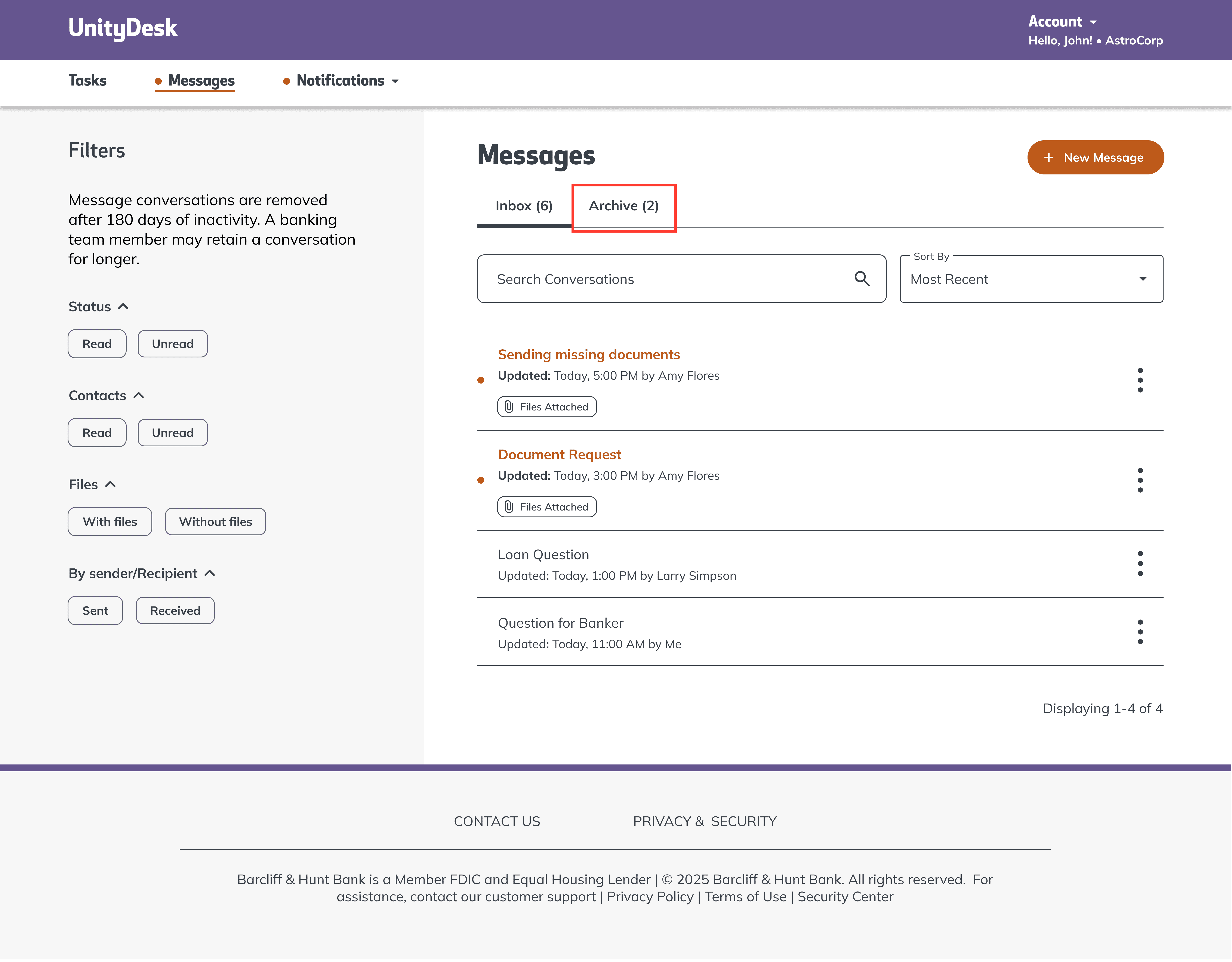
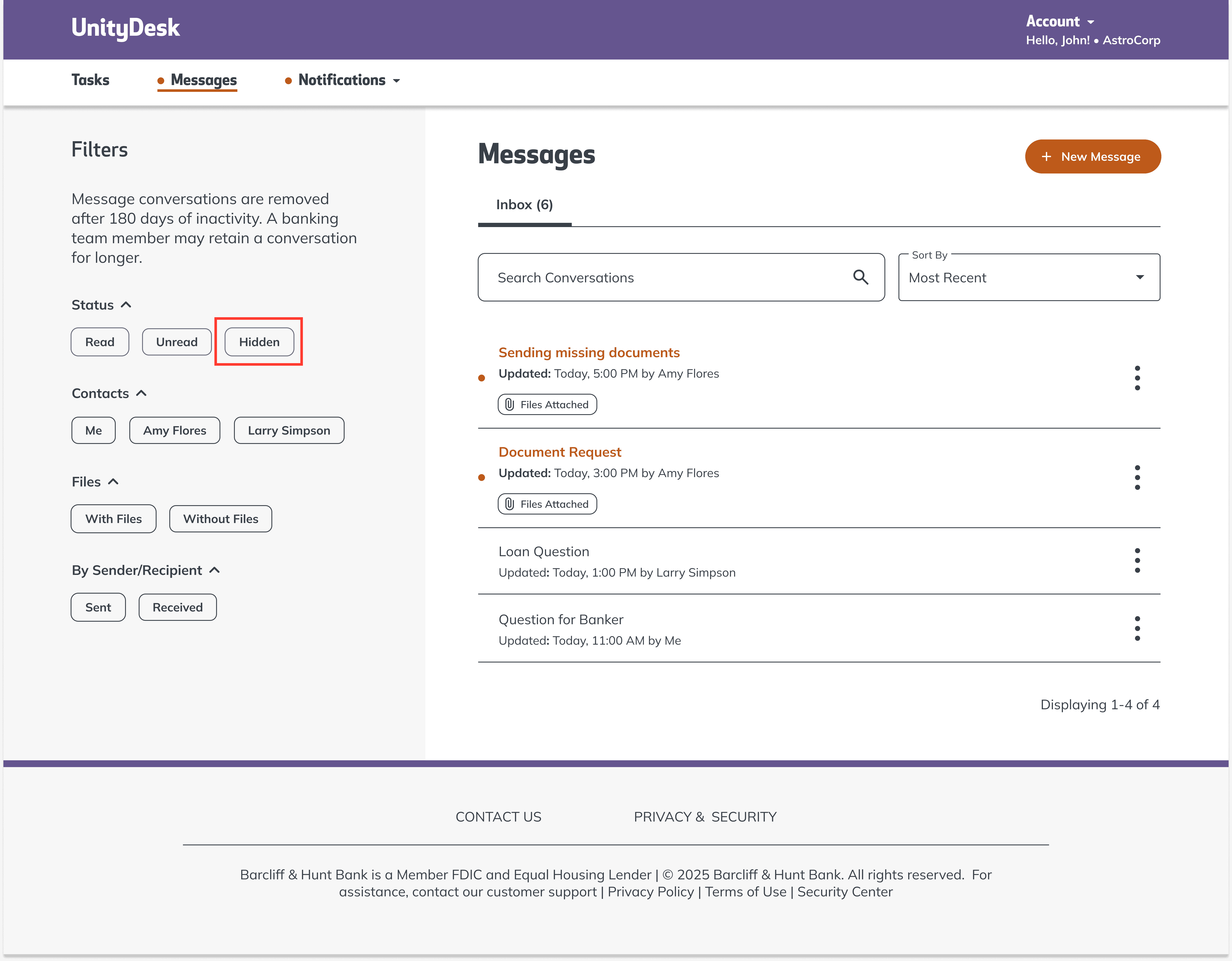
Following the Agile UX process, we design based on industry-best patterns, test with users, and iterate based on research findings. For example, user testing of our messaging feature revealed confusion around archiving, as users expected messages to remain despite content stating they’d be deleted. In response, we introduced a “hide” option, allowing users to manage their inbox without deletion, which wasn’t available at launch.
Validating Designs
Following the Agile UX process, we design based on industry-best patterns, test with users, and iterate based on research findings. For example, user testing of our messaging feature revealed confusion around archiving, as users expected messages to remain despite content stating they’d be deleted. In response, we introduced a “hide” option, allowing users to manage their inbox without deletion, which wasn’t available at launch.
Project takeaways
Learning when to use existing components vs creating new ones. Balancing design system use with creating new components saves time and improves UX. Expanding existing components is often preferable but knowing when to create something new and working with teams to get that process going is important.
Learning when to use existing components vs creating new ones. Balancing design system use with creating new components saves time and improves UX. Expanding existing components is often preferable but knowing when to create something new and working with teams to get that process going is important.
Learning when to use existing components vs creating new ones. Balancing design system use with creating new components saves time and improves UX. Expanding existing components is often preferable but knowing when to create something new and working with teams to get that process going is important.
Review the designs with developers. Creating mockups and sending them to be developed is not the end of the process. Reviewing designs with developers ensures accurate implementation, catches inconsistencies early, and prevents costly rework.
UnityDesk
UnityDesk is a secure portal for streamlined document exchange and collaboration between Barcliff & Hunt bank employees and customers.
ROLE
Lead UX Visual Designer
January 2024 - Present
overview
Creating an integrated digital solution
In 2021, through an internal study Barcliff & Hunt identified inefficiencies in commercial banking due to fragmented systems, requiring colleagues to juggle multiple vendors, emails, and calls. To streamline operations and enhance competitiveness, the bank launched an integrated sales, onboarding, and lending solution built for seamless integration and future scalability.
As lead UX Visual Designer, I worked closely with UX to create high-fidelity interfaces, refining existing designs and developing new features to improve the user experience.
Login enhancements
I redesigned the login page to enhance usability, accessibility, and aligned it with the new design system. I refined the visual hierarchy by adjusting typography, spacing, and contrast to improve readability and guide users. The CTAs were made more prominent and error recovery links were grouped for easier access.
Design Decisions
I enhanced visual hierarchy and clarity to streamline loan document management. Color-coded status labels highlight urgent tasks, while the left-hand filter panel helps users prioritize efficiently. Typography and spacing ensure a scannable layout, reducing cognitive load. Consistent design patterns improve usability and familiarity. These decisions create a more intuitive experience for customers and reduce inefficiencies for bank employees.
Streamlining document requests & uploads
This feature streamlines document exchange by replacing manual uploads and email-based submissions, allowing customers to securely download and upload files in one place.
Design decisions
Design decisions
Stay Informed with UnityDesk Notifications
Easily access important updates within UnityDesk and via email—no need to search through old emails. With real-time notifications customers stay on top of their applications, reducing delays and manual follow-ups from our team. This streamlined experience enhances engagement and drives a faster, more efficient process for everyone.
Design decisions
Design decisions

Seamless Communication with UnityDesk Messaging
UnityDesk’s messaging feature enables real-time, direct communication between customers and colleagues—reducing manual follow-ups and ensuring timely updates on applications. This streamlined, two-way interaction boosts transparency and accelerates the loan process.
Design decisions
Design decisions
Research
The solution speaks first — Here’s how we got there
An internal study revealed that our commercial banking faced inefficiencies due to fragmented systems, requiring colleagues to rely on multiple vendors, emails, and calls. This caused delays, errors, and poor transparency, highlighting the need for an integrated solution to improve productivity and stay competitive.
Uncovering opportunities for Improvement
Based on our analysis of 200+ customer and colleague insights, we identified six recurring challenges. Through reimagination workshops, we uncovered four main areas of opportunity.
One of these opportunities—customer self-service—emerged from addressing challenges such as lack of transparency and disconnected digital platforms. By further exploring customer self-service, we identified three key objectives that, when addressed, would resolve the most common pain points experienced in the onboarding and lending journeys.
The three key objectives
Enhancing Security
Resolve authentication challenges and improve the onboarding process.
Painpoints
Authentication & Onboarding Issues
Authentication & Onboarding Issues
Increasing Efficiency
Streamline document management and reduce manual work.
Painpoints
No Online Credit Application
Inefficient Document Management & Storage
Manual & Time-Consuming Customer Requests
No Online Credit Application
Inefficient Document Management & Storage
Manual & Time-Consuming Customer Requests
Improving communication
Streamline and automate customer interactions to minimize manual requests.
Painpoints
Customer Communication Barriers
Customer Communication Barriers
Reimagining the problem
With our needs and pain points identified, we asked: how might we design a solution that mitigates these issues, meets user needs, and aligns with business goals?
A design concept emerged: a digital self-service platform for managing confidential documents, accelerating loan processing efficiently
Development & Validation
Developing the designs
After creating high fidelity mockups I create development files allowing our engineers to help our engineers transfer design to code
I work closely with our engineers during this phase to make sure their work is matching our designs and that the interactions are correct.
Blurred for confidentiality
Validating Designs
Following the Agile UX process, we design based on industry-best patterns, test with users, and iterate based on research findings. For example, user testing of our messaging feature revealed confusion around archiving, as users expected messages to remain despite content stating they’d be deleted. In response, we introduced a “hide” option, allowing users to manage their inbox without deletion, which wasn’t available at launch.
Project takeaways
Learning when to use existing components vs creating new ones. Balancing design system use with creating new components saves time and improves UX. Expanding existing components is often preferable but knowing when to create something new and working with teams to get that process going is important.
Review the designs with developers. Creating mockups and sending them to be developed is not the end of the process. Reviewing designs with developers ensures accurate implementation, catches inconsistencies early, and prevents costly rework.